Quick Update!

Monday, February 8, 2016

Hi, everyone!

I wanted to pop in with a quick explanation for the last couple of weeks' silence and to also let you know what's coming up.

First, I still have lots of CHA photos to share and will get back to posting them tonight. The last two weeks of January were super busy ones for Star & Bee (plus my regular job, too), and then I took a few days just to be creative and make some things before throwing myself back into work and photo editing again.


I really wanted to finish off the Month of Challenges at The Lilypad, so I sat down and somehow managed to get all 31 layouts finished by the February 2nd deadline! They're all posted in my gallery there, but I'll be sharing a few of my favorites here, like the one above!


Second, I was a guest along with May Flaum and Tami Morrison on the most recent episode of the Paperclipping Roundtable podcast. We chatted about CHA and some of the trends we saw both on the product side and the business side of things. You can listen to Episode 270 here!


Third, Lawn Fawn's first release week featuring the new items from CHA Winter 2016 is starting this Thursday over on the Lawn Fawn blog! I'm finishing up some projects and will be sharing those here next week amidst the continuing CHA photo posts.

I'll be back later tonight with more CHA photos! Thanks so much for your patience!

A Couple of Cards, a Couple of Layouts, and a Photo Printing Chat

Thursday, July 30, 2015

Hello and happy Thursday, everyone!

Thank You!!

I wanted to take a minute to seriously thank you all for welcoming me back to blogging. It's been great seeing so many familiar names (and some new ones!) in the comments, and I appreciate all of you!

Trade Show/Sneak Peek Update

Before I launch into sharing today's projects, I also wanted to let you know that sneak peeks of the new fall and winter scrapbooking products are still being released by manufacturers. I was surprised to see new ones (like Amy Tangerine's new line with American Crafts) pop up after the PaperArts (CHA) show had ended, and then I realized that the majority of manufacturers were at the relatively new (I think it started last year) Sierra-Pacific Mixed Media show or had opted out of attending a trade show altogether.

I'm still gathering up all of the sneak peek and reveal links that I can find and am adding them to the 2015 Summer Sneak Peeks page.

New Cards

I am still admittedly not a great cardmaker, but ever since acquiring a set of Zig Clean Color Real Brush Markers (yes, they are all they're hyped up to be!), I've been having a blast learning how to color with them. I still have quite a ways to go, but I do have a card made with them to share today.
DSC_0059.jpg

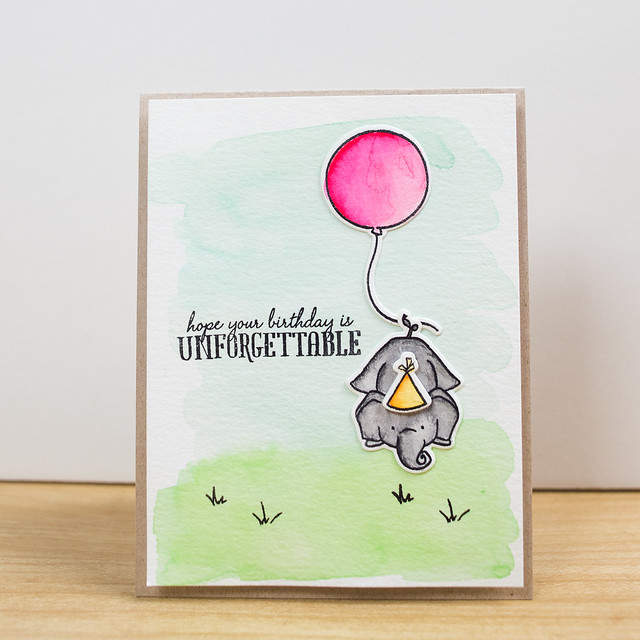
My niece, Sophie Clare, turned 5 a couple of weeks ago, and I pulled out my freshly-arrived markers and the Unforgettable stamp set by WPlus9 to whip up a birthday card for her. She has had a stuffed elephant name Eloise since she was a baby, so I thought she'd enjoy an elephant on her card. The elephant, hat, and balloon are colored with the Zig markers, and I used a wash of diluted dye ink (Mermaid and Freshly Cut Grass by Lawn Fawn) to watercolor the background. And then at the very end I managed to stamp the sentiment a little crooked. Doh!

I used Canson XL watercolor paper for both the background and the die cuts simply because it's what I had around, but I picked up some Strathmore 300 series paper on sale at Michaels a couple of days ago and think I may like it more (both brands are available at Michaels). The Strathmore seems to lend itself to a little smoother blending both in a single color and between colors, but I want to use it a little more before I declare that. Also, I am not an artist by any stretch of the imagination, so I really have no idea which paper to use for certain purposes.

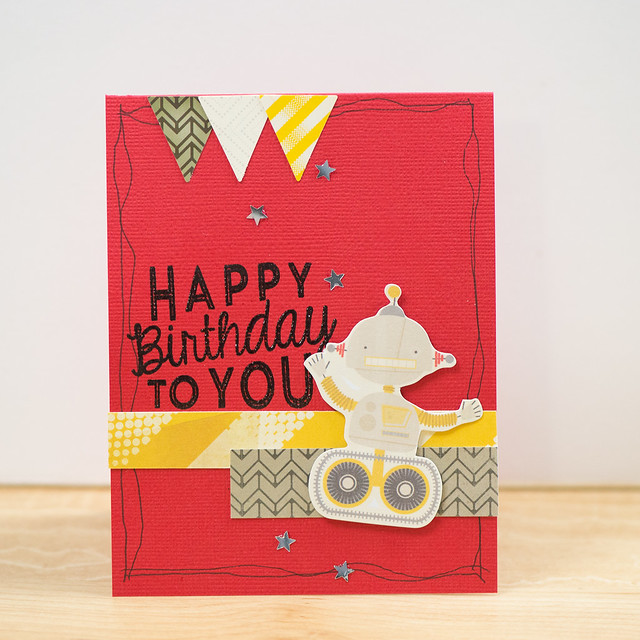
My second card is what I call a "scrappy" card (vs a "stampy" card like the one above) and was made for my nephew's (on Darren's side) birthday. He is a totally geeky kid who loves Doctor Who and anything science related, so I used some of Crate Paper's Boys Rule collection for his card.
DSC_9943.jpg

I like to start a "scrappy" card with a large die cut or other embellishment as the focal point, and the robot from the Boys Rule die cut pack was perfect here. I filled the rest in with some paper strips, a few stickers, and some pen drawing around the edges before adding a sentiment stamp from Avery Elle to finish things off.

If you're interested in the supplies I used for either card, I've linked them up at the end of this post (affiliate links used where possible). Some items like the Crate Paper products are hard to find in stock now. I haven't shopped for physical scrapbooking supplies in a looooong time, so most of my stash is "well aged" at this point.

Layouts

I've found myself at the computer more than at my scrap table lately, so both of the layouts I have to share today are digital. There are definitely paper layouts in the works, I'm just waiting for my photo print orders to arrive (more on that in a bit).

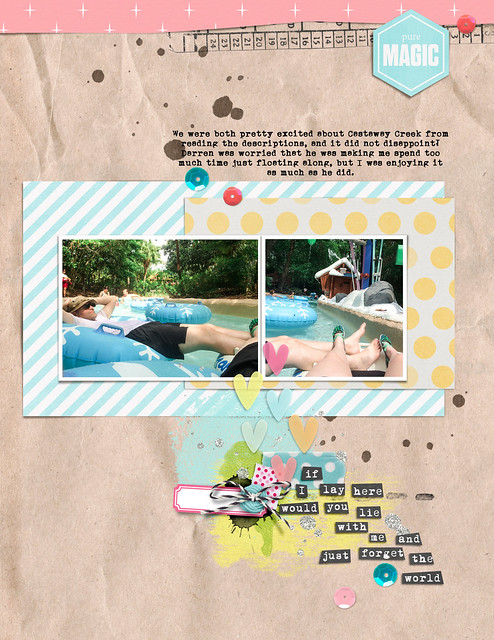
My first layout includes photos from the DisneyWorld vacation that Darren and I took last year (my first time at Disney!). We loved the theme parks, of course, but we also really enjoyed taking a couple of relaxation days during the week that were were there to just chill out at the water parks. Our favorite at both Blizzard Beach and Typhoon Lagoon? Cross Country Creek and Castaway Creek (and I totally used the wrong name in the journaling on my layout, but the beauty of digital is that it's easy to fix!). We spent hours just chilling on the "river" and enjoyed every minute of it.

song lyric challenge

All of the supplies for both of my digital layouts today are linked up over in my gallery at The LilyPad, so you can hop over there if you want to see more.

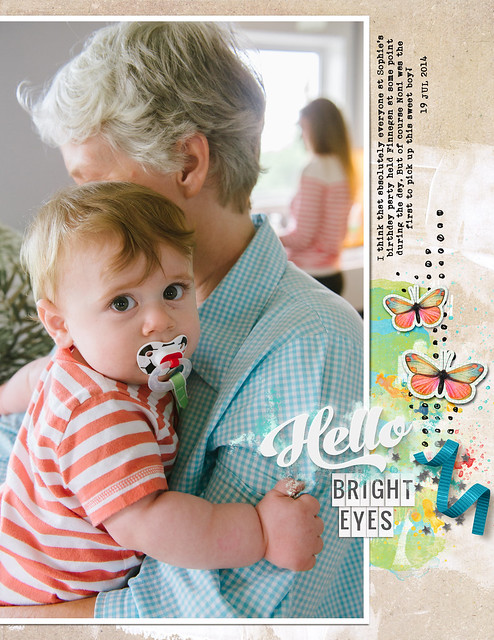
The Pad has pretty much become my digital home, and I find that the designs there really speak to my style. They also host some great challenges every month, and I've been finding that they're awesome for getting me started on a page when I'm not quite sure what I want to scrap. The page above was in response to a song lyric challenge (I used word art by Just Jaimee), and the page below was the result of a "Fill It Up" challenge. I always have a hard time using tons of patterned paper to fill a layout, but a photo enlargement? That I can do. Especially in digital, since I don't have to first procure an enlarged photo print!

07_19_helloBrightEyes

That's my nephew, Finnegan (Sophie Clare's brother) at Sophie's birthday party last year. And since a reader (hi, Margot!) asked about how my niece and nephew were doing, I thought I'd share just a couple of photos from Sophie's birthday this year.

DSC_0072.jpg

I can't believe that this girl is already five, especially since I've been blogging about her since the day she was born! She had her birthday party at her gymnastics school, and then she and her brother came home with my parents for the weekend- I got to spend lots of time with both of them!

Speaking of her brother, you've already seen his photo from last July, but this July? Oh, my!

DSC_0436.jpg

Seriously, if he were any cuter, I would not be able to stand it!! He's a hilariously fun little bundle of energy and had just as much fun at Sophie's party as the big kids did!

And I have another birthday kid that I don't want to leave out- Mike!

DSC_9950.jpg

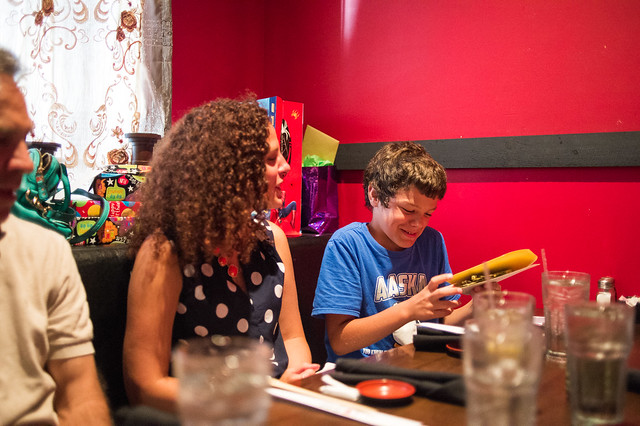
Mike was the recipient of the robot card (with some $$$ inside, of course!), and had his birthday dinner at a sushi restaurant. The rest of the family went on to see Jurassic World afterward at his request, though I politely declined that portion of the evening's festivities because I'd like to sleep again sometime in the next decade. I'm still not quite over being scared by Jurassic Park as a kid, and I'm sure the new one would give me nightmares! Darren said it was awesome, though. :)

Photo Printing

Okay, one last little thing, and then I'll quit rambling at you!

One of the reasons that I have struggled to make paper layouts for the last year or so is that I hadn't printed photos in a long time. Like, as in since the beginning of 2013, except for Project Life photos. I had a ton of pictures edited, but sitting down to plan out sizes to print for layouts had become such a chore that I just stopped doing it.

Earlier this week I decided to just chuck the whole "choose perfect sizes for each group of photos for each layout" mentality and just print everything at the same size. I know this is not a new or earth-shattering idea in the realm of scrapbooking by any means, and it's something that my crafty friend May Flaum has advocated for years. I actually have no idea why it took me so long to just go that route, but I finally did!

I am so excited to now have over 500 photo prints on their way to me, with each print containing two photos (putting two on a sheet was so easy to do using Lightroom and the method I blogged about a couple of years ago). I wasn't very selective in what I printed and mostly just uploaded everything that I had edited that wasn't something I shot specifically for the blog (like a scrapbooking project). My thinking is that it will be easier to choose from a stack of printed photos and immediately start scrapping than it will be to go through photos on the computer and the wait for them to be printed before I can make a page. I'm sure that many, many of those photos won't be used on layouts, but a bunch of them will probably end up in companion pocket pages alongside traditional layouts.

I printed all of my photos at 2.5 x3.5 (May prints hers at 4x6) for a couple of reasons. First, I generally like to use 2-3 photos on a page, and that size is perfect for that number of photos on an 8.5x11. Second, I'll be using baseball card page protectors as the companion pocket pages (again, because they're 8.5x11), and that's the perfect photo size to include in a pocket.

My photos were all ordered from either Snapfish or Shutterfly using some coupon codes they had available at the time. I like the print quality from both services, so it really comes down to who has the best deal when I'm ready to order. My favorite is when Snapfish has their "Penny Prints" sale, which just happened to be going on earlier this week. With shipping, each set of 99 prints was $6.88, or about 3.5 cents per photo (with two photos per sheet). That's an even better deal than the 100 free prints per month that they offer for the first year of using their app, which for some reason has higher shipping prices. For the same 99 "free" prints, the cost would have been $8.99 due to the higher shipping rate. I'll be sure to keep an eye out for future Shutterfly and Snapfish deals in the future and will post them here if you guys are interested in knowing.

The End (for today)

Thanks so much for hanging in with me for such a long post! I hadn't intended to talk about so many things at once, but the longer I waited to write the more things I kept adding to talk about!

I hope you all have a fantastic day, and thank you for taking the time to read here!


Supplies

If you're interested in any of the supplies used in the projects shown in this post, you'll find them linked below. I use affiliate links where available and, while I do receive a small percentage of sales that result from clicking on them, clicking on them will cost you nothing.


american crafts announces new ac digitals shop

Monday, December 3, 2012


The news broke on Becky Higgins' blog this morning that American Crafts has entered the digital scrapbooking world by opening their own digital shop, AC Digitals. AC Digitals will be carrying both past and current collections from most of the American Crafts family of brands in digital format, starting with a small selection being introduced this week (including Amy Tan's Ready. Set. Go. full collection) that will be expanded in the weeks to come with new products being announced on Mondays. Brands included in this new venture are American Crafts core collections (including the Dear Lizzy and Amy Tangerine signature lines), Crate Paper, Pebbles, and Becky Higgins' Project Life. Noticeably absent from the lineup is Studio Calico, who maintains a production-and-distribution-only relationship with American Crafts while retaining full rights and control of their own artistic properties.


I'm pretty much a paper scrapper (though I dabble in digi now and then), but I have reasons for getting quite excited when I hear that another scrapbooking manufacturer has opted to release their existing paper lines in digital format. Being able to print out just the small section of paper I need without having to store a whole collection and the ever useful Print and Cut feature of the Silhouette cutter are two big ones, but there's a third (and perhaps more peculiar) one at play that I think at least a few of you might share with me.


I like pretty paper. A lot. And sometimes there's a sheet so pretty (ummm, the map print above from Crate Paper's Sleigh Ride collection, anyone?) that I hesitate to cut into it for fear of never being able to get hold of that pattern again. Having a digital copy of those same patterns makes it much, much easier for me to chop up paper and use it on my layouts, knowing that all I have to do is go into the Lightroom catalog where I store my digital supplies to be able to see it again in all of its whole, uncut glory, and I can even have it printed again in 12x12 format (though it's not really cost-effective to do so, simply having the option gets rid of all the anxiety for me) if needed. It also eliminates the ever-popular "buy two sheets just in case you ever want it again" way of solving the problem, reducing the amount of money and storage space used for duplicate physical supplies. I admit that this quirk may be unique to me, but it's my main reason for doing a little happy dance every time one of my favorite manufacturers adds digital to their existing line.

And that map print paper? It's available in either the individual digital paper pack or full digital Sleigh Ride collection, and this week it's even 25% off as AC Digitals celebrates its grand opening!


American Crafts joins popular lines such as Echo Park, Carta Bella, Glitz, Fancy Pants, Jenni Bowlin, Pink Paislee (all available at Jessica Sprague), and others I'm sure I'm missing in the joint digital/paper frontier. Now, will someone please call up October Afternoon and politely ask them to join the party so I can chop up some of their lovely papers that I'm hoarding right now? 

bella blvd layout | hello cupcake

Tuesday, February 21, 2012

DSC_1800.jpg

Shannon Tidwell is guest designing with us over at Bella Blvd. this week, and she came up with a bundle of fun challenges for the design team to play along with. My challenge? To use paper from four or more different collections

Hel-lo, you know I was elated with that one! As someone who used to make her own kits and still enjoys scrapping with kits (that other people have made) on a regular basis, mixing paper lines is so not a problem!

DSC_8799.jpg

When I mix collections, I try to start with a color scheme to tie everything together. It can also help to start with a theme, an idea of the types of patterns you want to use- basically anything that's a common "vibe" between the papers to help them hang together. In this case I used the colors from my photos as a starting point and pulled together a selection of red, yellow, and blue (well, in this case aqua, but who's counting...) designs, then added in a neutral in the form of gray.

DSC_1803.jpg

I also picked out a selection of coordinating embellishments including some Baby Blooms a Bella, a package of older Sophisticates chipboard, and a roll of the new designer tape.

And, mmmm, couldn't you just eat one of those cupcakes right now? I baked these sometime last summer just for fun and have had photos of them in my to-be-scrapped box ever since.

DSC_1802.jpg

Supply List:

Sophisticates: Blue High Five Alphabets, Essentials Peep and McIntosh
Chipboard, Simply Simona McIntosh Chipboard
Baby Blooms a Bella: Azzini, Saffron
Midterm: Blurbs
Designer Tape: Yellow Chevron
Sunny Happy Skies: Creamsicle Clouds
Family Dynamix: Quadrants
Sunshine and Happiness: Borders, Happy Clouds
Hello Beautiful: Just Because
Socialite: Tango

journal your christmas december 1-2 + december daily in reality

Tuesday, January 10, 2012

So, you say you haven't finished your Christmas journal yet? Perhaps you've barely even started? Well, you're in good company! Or at least you're in my company, which may or may not be good depending on who you ask. :)

Some of you may remember my big plan for doing a digital album for Shimelle's Journal Your Christmas project this year. Some of you may also have read my post this weekend about what my December was like. Let's just say that life happened to my album just like it happened to me.

I also had some computer problems- something that I'm not used to seeing as how a) I'm a software engineer by day and b) I use a Mac!! Long story short, I had two issues- my web browser and memory. I've known for a long time that my Firefox web browswer was getting more and more bloated and taking up more and more memory just sitting there. (If the software I wrote for work leaked like that, I'd be in huge trouble.) I've since made the switch to Google's Chrome browser and am much happier for it. As for the memory, my fairly new (about a year and a half old) 27" beast of an iMac only had 4GB of RAM, and I was trying to run Photoshop CS5, Lightroom, Firefox (before I switched), and the DVD player (because I have to have my Stargate while I scrap) all at the same time. It was all just too much for that little bit of memory, so I bought another pair of 4GB sticks to shove into it for a total of 12GB, and now it's perfectly happy running all that at the same time.

But back on the scrapping front...

As it turns out, after Christmas lots of blog posts started popping up written by scrappers who were either very behind or just starting on their December albums, or choosing to do their own thing, regroup, or go in an entirely different direction. I've collected just a few to help encourage those of you who are in the same boat as I am.
I'm hoping that if you're feeling like you'll never get your album finished you'll take the time to click on a link or two and read and perhaps feel a bit better...or at least not so alone.

As for me, I'm still planning on completing my album. I've got all the photos edited and planned out for each day, along with some notes. And one of the good things about doing it all at the end? I can batch tasks! Right now I'm in the process of selecting a digital template for each of the remaining days and simply dragging photos and supplies onto it and saving it to be scrapped later- perhaps on the plane to CHA at the end this month. And since it's digital it's something that I can open up and work on when I have a few minutes here or there without having to worry about continually dragging out and then putting away physical supplies. Thank goodness I did all that planning before December started!

I do have a few pages completed, though not necessarily in order. The first two are ready to share, though, and I'll be continuing to post my pages until the album is finished.

December 1- The annual Christmas "Manifesto" prompt for those following Journal Your Christmas.

December 01.jpg

December 2- The Weather

December 02.jpg

If you're still working on your own Christmas journal, I've got a Pinterest pinboard going with lots of amazing albums by those who did manage to finish theirs. That's another good thing about being behind on this- I can enjoy everyone else's albums and lift ideas.

So, who else is with me on getting these things finished? 2010 will not be remembered as the year I didn't get my journal done!

journal your christmas + december daily 2011 | the plan for doing it digi

Tuesday, November 22, 2011

2011 marks the fourth year that I'll be completing a Christmas journal of some kind. In 2008 I played along for the first time and created one of Ali's December Daily albums, and in 2009 and 2010 I switched over to Shimelle Laine's Journal Your Christmas class (and never looked back- it's awesome!). This year I'm once again following along with Journal Your Christmas, but I've decided to do something drastically different from the paper albums that I've created in the past- this year I'll be going completely digital with my album!

I've dabbled in digi before, creating photo books and even a completely digital layout earlier this summer, but I've not attempted a wholly digital album before, complete with papers, embellishments, and ::gasp:: even drop shadows!

So, why did I choose to switch formats this year? Lots of reasons, actually...
  • The supplies...and how I hate that they are all. over. my. scrap. room. for the entire month of December and into January (because, unlike December Daily, Journal Your Christmas runs until January 6!). It seriously makes it impossible to get any "regular" scrapping done because Christmas supplies seem to proliferate and cover every available (and some unavailable) flat surface in the course of making the journal. And, yes, I could theoretically put the supplies away after I make each page, but I know me, and if I have to drag all that stuff out and then put it away for every page, it'll just never get done. With digi, all the supplies are stored neatly in their own Lightroom catalog, and getting them out and putting them away is as easy as opening and closing that program. I think I can handle that.
  • The portability. While we don't have any trips on the scale of last year's jaunt to Nassau planned for December, I'm sure there will be at least a few long stretches in the car (or on a plane- who knows) where I'll have some time to work. I've done scrapbooking on the go before (in fact I blogged about it recently here) with great success, but nothing beats being able to simply toss my sub-3-pound MacBook Air into my backpack and head out the door. It's so light and easy to pack, and it doesn't make TSA get all twitchy about liquids and sharp objects.
  • The storage. The album itself is pretty chunky when finished- at least it is for me and my Thicker-obsessed self. I'm totally good with that for my regular scrapbook albums, but there are only so many books my shelves will hold, so saving space here and there is a good thing. I love that photobooks (which is how I plan to have my album printed when it's finished) are so thin and compact and am looking forward to having a Christmas album that doesn't weigh 18 lbs. (And, yes, I admit that is total hyperbole.) You may wonder, though, about all the "stuff" that normally goes into one of these books- the brochures, the cards, the tickets, the receipts- and where I plan to put that since it won't fit very well into a digital book. The answer? Into my newly-rebooted Project Life album! I plan on keeping up with both projects throughout December, so all that physical stuff will have a home, too.
  • The sharing. Let's face it- digital pages take a lot less time to prep to upload and share than their paper counterparts. Instead of photographing pages every day (I'm making a huge assumption here that I'll actually get the pages completed each day!), all I have to do is export a web-friendly version and upload.
  • Did I mention the supplies? While I have a pretty good stash of Christmas supplies (that I really do plan to put to good use on other scrappy projects this season), I also have a ton of cuuuuuuuute and fun digital supplies that I'm dying to use in this album. And I may or may not have added just a few more items since starting to gather them all together...
One thing I do miss already in this paper-to-digi Christmas journal transition is getting to share my "foundation pages" before getting started on the actual book. As a consolation, I'm instead sharing the roundup of the supplies I've brought together to use for this book. I gotta admit, even I'm loving seeing them all together in one place- it makes me want to just get started, already! :)

While I may not have actual foundation pages made, I am choosing to make things a bit easier on myself by using digital templates for this album. I'm using templates by two different designers and will be mixing them up throughout the album. As an aside, I haven't decided if I will print at 8x8 or 12x12 book yet, but I do know it will be square. I'll be assembling all the pages at a 12x12 resolution and will simply size them down to 8x8 if I decide to go that route.

First up in my supply list are all of Ali Edwards December Daily layered templates (Volume 1, Volume 2, Volume 3, and Volume 4). I especially love the newest designs, including that gorgeous bracket shape!


I'm also mixing in Liz Tamanaha's (Paislee Press) Snapshots No. 3 templates. I love the clean lines and those awesome TTV style photo frames.


When it came to choosing paper collections, I had no problem settling on my main line. I've loved the Jolly By Golly collection by Cosmo Cricket for years, but for some reason I never bought it when it was out in paper form. You can bet, though, that when it became available at JessicaSprague.com that I scooped it up (on a One Buck Wednesday deal, no less!). I'm using the Paper Pack, Candy Candy, and Elements in this album.


I love Echo Park's paper designs, and I especially love that they are available in digital format, too! I've been hanging on to the Everybody Loves Christmas Paper and Elements packs for almost as long as I've had the Cosmo Cricket stuff, and I think that the two collections will work well together. So many fun, bright colors!


I really, really meant to cut off the paper selections with just those two sets, but then darned if Design House Digital didn't bring Lori Whitlock on board as a new designer a couple of weeks ago. Lori Whitlock is the creative genius behind many of the paper lines at Echo Park and large portions of Becky Higgins Project Life kits, so of course I loved her Christmas Day collection! I picked it up to use, too, thinking that those doilies might add just a touch of vintage to some of my pages.


My final addition (I mean it this time...I think!) was made just last week when Sara Schmutz (also at Design House Digital) released her awesome new Jolly kit. Chevrons, pretty tags, and cute snowmen? Yes, please!


So that rounded out the collection kits for my album, but what about all those little extras that I enjoy adding to my paper pages? I went hunting through my stash (and perhaps, ahem, purchased a few new items) to round out my supplies selection.

I love baker's twine and will be adding it to my digital pages in the form of these Baker's Twine Photo Wraps by Splendid Fiins.
 
And buttons? These pretties by Crystal Wilkerson will fit the bill quite nicely.

 
Of course I had to include some of Rhonna Farrer's fabulous Christmas Junque collection including her Christmas Junque Pieces and Christmas Junque Brushes kits.


I stitch on nearly every paper layout, so it makes since that I should include some digital stitching, as well. These Bright Basics In Stitches by Robyn Meiretto should coordinate nicely with my paper selections.


I'm sure I won't use all of them, but these Holiday and Christmas word art packages by Ali Edwards (Holiday Word Art Volume 1, Volume 2, and Volume 3, + Messy Little Christmas) are great to have in any Christmas journal stash, just in case.


I mentioned that I do intend to drop shadow this album, but I failed to mention that I'm a lazy shadower. I'll be using Gennifer Bursett's Toolbox Shadows V. 1 for all my shadowing needs.


I should note that I did choose a few more kits that aren't mentioned here- mostly old House of 3 (sniff, sniff...so glad Rhonna started her own site after they closed!) kits that I could no longer find previews or links for. 

As for keeping everything organized, I've added all my selected supplies to a special collection in Lightroom so I can access them with just a click. Everything is in here, including templates...


...papers...


...and embellishments.


As I was sorting through items to add to the collection, I chose only colors that coordinated with my papers from items like the stitching and button kits. Also, if I happened to come across labels, buttons, or bling from any other kits that looked like it would work, I added them to the collection as well. Everything is so easy to look through just by scrolling!

So there you have it- my grand plans for a brand new (to me) format for my Journal Your Christmas album. I'm so very excited to try doing it digi this year- here's hoping I'm not getting in over my head!
CopyRight © | Theme Designed By Hello Manhattan